Why QuickBooks Can't Produce a True Cash-Basis Report From Accrual Books

Key Points
QuickBooks’ cash basis toggle only removes unpaid invoices and bills, so accrual journal entries, deferred revenue reclasses and prepaid payments still distort the report.
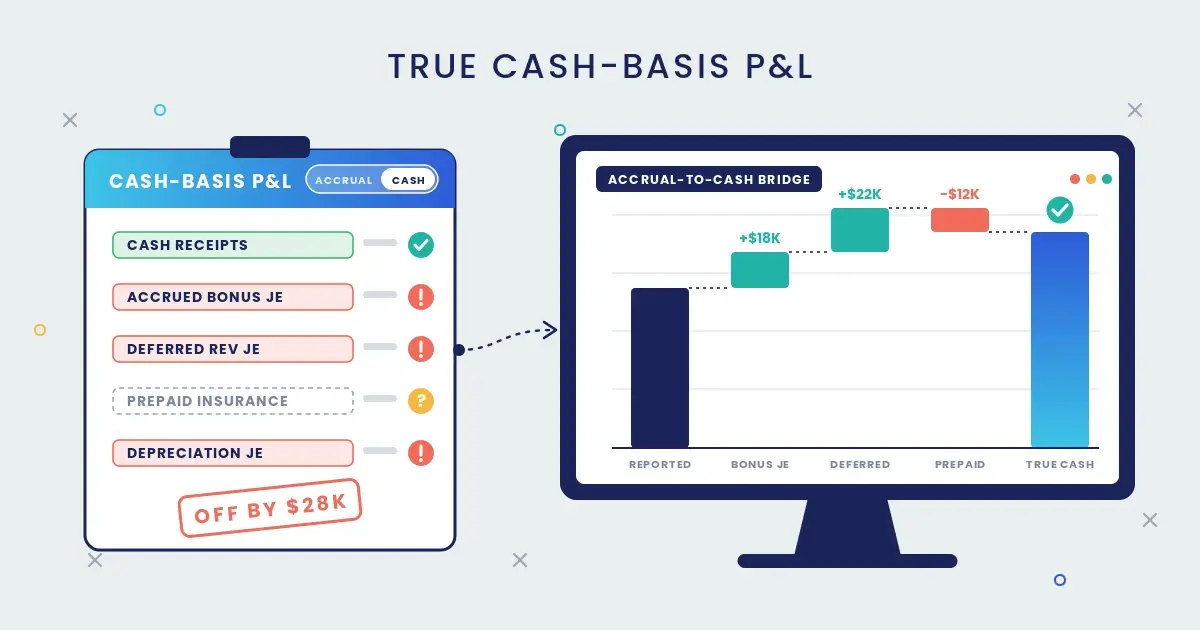
In our December example, three ordinary year-end entries understate cash basis profit by $28,000 - which is enough to materially change a tax payment, a distribution, or partner draws.
SPRCHRGR’s dashboards rebuild a true cash view from your QuickBooks transactions side by side with accrual using repeatable logical rules so that nobody has to make those adjustments by hand in spreadsheets.
Every year around this time we get some version of the same call, from a client or from a CPA partner: year-end tax planning is a few weeks away, and the cash-basis P&L out of QuickBooks doesn't match what went through the bank. Most QuickBooks reports have a toggle at the top that says "Cash," so it's a fair assumption that the numbers underneath it should accurately present cash basis results. But for a company whose books carry a normal mix of accrual entries (which is just about every company out there), that assumption breaks every month-end. In our experience, that gap can be tens of thousands of dollars in a single month.
By "true cash basis" I mean a report where income shows up when the money arrived and expenses show up when the money left, with nothing else mixed in. QuickBooks gets partway there on its own, but the rest has to be rebuilt outside of the system before a business can actually trust the cash basis numbers.
What the cash toggle does
QuickBooks builds its cash basis reports by starting from the accrual books and removing specific types of activity, namely income on invoices customers haven't paid yet and expenses on bills you haven't paid yet. That's the whole conversion. For a company that runs every dollar through invoices, bills and payments applied to them, that might be good enough.
Everything else in QuickBooks posts the same way under either cash or accrual basis. Intuit's own help documentation says that journal entries touching a balance sheet account and an income or expense account "affect both cash and accrual basis reports," and one long-time contributor to Intuit's community forum summed it up more bluntly: "All accounting events in QB are by their nature cash basis except for AR and AP transactions."
So the software's working definition of cash basis is "no open invoices or bills," while an accountant's definition is "when the money moved." For a growing company with a real month-end close, those two definitions drift apart a little farther with every adjusting entry.
Where the leaks come from
These are the most common sources we find under the hood of a QuickBooks cash basis report that doesn't tie to the bank:
- Accrual journal entries. Accrued payroll and bonuses, accrued professional fees, revenue earned but not yet billed. Each one is recorded with a journal entry, so each one lands on the cash basis P&L as if it had been paid. QuickBooks Online has no setting to exclude them, and users have been asking Intuit for one in its community forum.
- Deferred revenue reclasses. A customer pays a $24,000 annual contract up front and the controller moves the unearned portion to a liability, which is the right call on an accrual basis. On a cash basis the full $24,000 came in this month, and the report shows only what's been earned so far.
- Prepaid expenses. Pay a year of insurance in December and code it to a prepaid asset, and the cash basis P&L shows nothing in December, followed by a monthly amortization entry in each of the next 12 months, none of which involved cash.
- Depreciation and amortization. Journal entries again, so they flow straight through – a tax preparer may want them there, while an owner deciding how much to distribute usually doesn't.
- Liabilities QuickBooks won't remove. Kaufman Rossin lists unpaid payroll taxes, credit card liabilities and sales tax payable, along with inventory purchased on a bill. A credit card charge counts as spent on the day it's charged, whether or not the card has been paid.
- Stray receivables and payables. Payments that were never applied to the invoice or bill they paid, credits never linked to anything, and journal entries posted straight to A/R or A/P all leave balances sitting on a cash basis balance sheet that's supposed to have none. Intuit's own support article explains why: "QuickBooks is a bookkeeping program and must balance, so for accrual-based business that reports on cash basis, QuickBooks will display AR and AP."
What that looks like in one month
Here's an illustrative December for a services company with three ordinary year-end entries:
| December activity | QuickBooks cash basis P&L | Cash that moved | Effect on reported profit |
|---|---|---|---|
| $18,000 year-end bonus accrued, paid in February | $18,000 expense | $0 | Understated by $18,000 |
| $24,000 annual contract collected, $22,000 moved to deferred revenue | $2,000 revenue | $24,000 | Understated by $22,000 |
| $12,000 annual insurance paid, coded to prepaid expense on the balance sheet | $0 expense | $12,000 | Overstated by $12,000 |
| Net effect | Understated by $28,000 |
Each of those entries belongs in the accrual books, and the cash basis P&L report simply treats the first two transactions as cash and completely ignores the third. For a business that files taxes on the cash method, a $28,000 swing in December changes the estimated tax payment, the year-end distribution, or the equipment purchase someone was planning to pull into the year. For a law firm or CPA practice that divides cash receipts among partners, which many still do, it changes the amounts of those distributions too.
How the accounting profession works around it
Every accountant who has lived with this has a workaround, and most of them live in Excel. The common ones:
- Export the cash basis P&L, run a journal report for the same period, back out the accrual-only entries line by line, and then add back cash paid into prepaid and other balance sheet accounts.
- Rebuild cash basis from the bank up, by exporting every bank and card account's activity and sorting each movement by the account on the other side of the transaction. This is the most accurate approach and also the most tedious, because deposits that bundle several customer payments and payroll runs that split across a dozen accounts have to be pulled apart by hand.
- Tag every adjusting entry with a dedicated class and filter that class out of the cash basis report. It's tidy when the discipline holds – and it still misses anything that wasn't a journal entry to begin with, like the prepaid insurance above.
- Post accruals only at quarter-end or year-end, with reversing entries, so the monthly cash reports stay mostly clean. That trades away an accurate monthly accrual P&L, which is the report most owners should be running the business on.
All of these work, and I've seen good accountants do every one of them well, though each one depends on a person remembering the rules every month, and the spreadsheet it produces is out of date the moment someone edits a prior period in QuickBooks. My gut tells me most owners have no idea how many hours go into that bridge each year-end, or that the cash figure on their desk came out of a bespoke spreadsheet only one person can follow.
How we solve it
At SPRCHRGR, our financial KPI dashboards connect to QuickBooks Online through Intuit's secure API n level – every line of every invoice, bill, payment, deposit and journal entry, along with which payment was applied to which invoice or bill – and accurately rebuilds the cash basis view based on rules we configure in our system instead of by hand:
- Income and expenses are recognized on the date cash moved, traced through each payment back to the original invoice or bill so the revenue and expense categories stay intact.
- Accrual-only journal entries are left out of the cash view and kept in the accrual view.
- Cash paid into prepaid expenses, deposits and similar balance sheet accounts shows up in the month it left the bank, and the later amortization entries drop out.
- Deferred revenue reclasses are reversed in the cash view, so a customer's up-front payment counts when it arrives.
We can also further customize those rules to account for other subjective adjustments that your tax professional wants to apply as 'tax only' adjustments intended to flow into your actual tax return – so our clients can have their cake and eat it too!
The accrual and cash basis views sit side by side, with a bridge between them listing every reconciling item, and each item drills down to the transaction in QuickBooks that supports it. The books stay on an accrual basis, which is where they belong for running the business, while both the latest accrual basis and cash basis numbers are always available in our dashboards without delays or spreadsheet heroics standing in the way.
Before you trust the next cash basis report
Run your cash basis balance sheet for the last month-end and look at accounts receivable and accounts payable. If either one shows a balance, the report is carrying activity it shouldn't, and the P&L that goes with it probably is too. If your CPA is about to ask for cash basis numbers for year-end planning and you're not sure the ones in QuickBooks will hold up, we'd be glad to walk through what the bridge looks like on your own books.
This post is general information, not accounting, tax or financial advice. Talk to your advisors about your specific situation.
Share